Your configurations.
Always in reach.
Activate a paid plan to create browser configuration records in TERNYLO, then organize and export your work. Use clear names, project groups and useful notes to make your next task easier to pick up.
01. Give the configuration a clear purpose
Activate a paid plan with a confirmed crypto payment first. Then open Browser profiles and select New profile. Add a name, a group, a target operating system, a location and any instructions you need. Select Save profile to keep the record in your workspace.
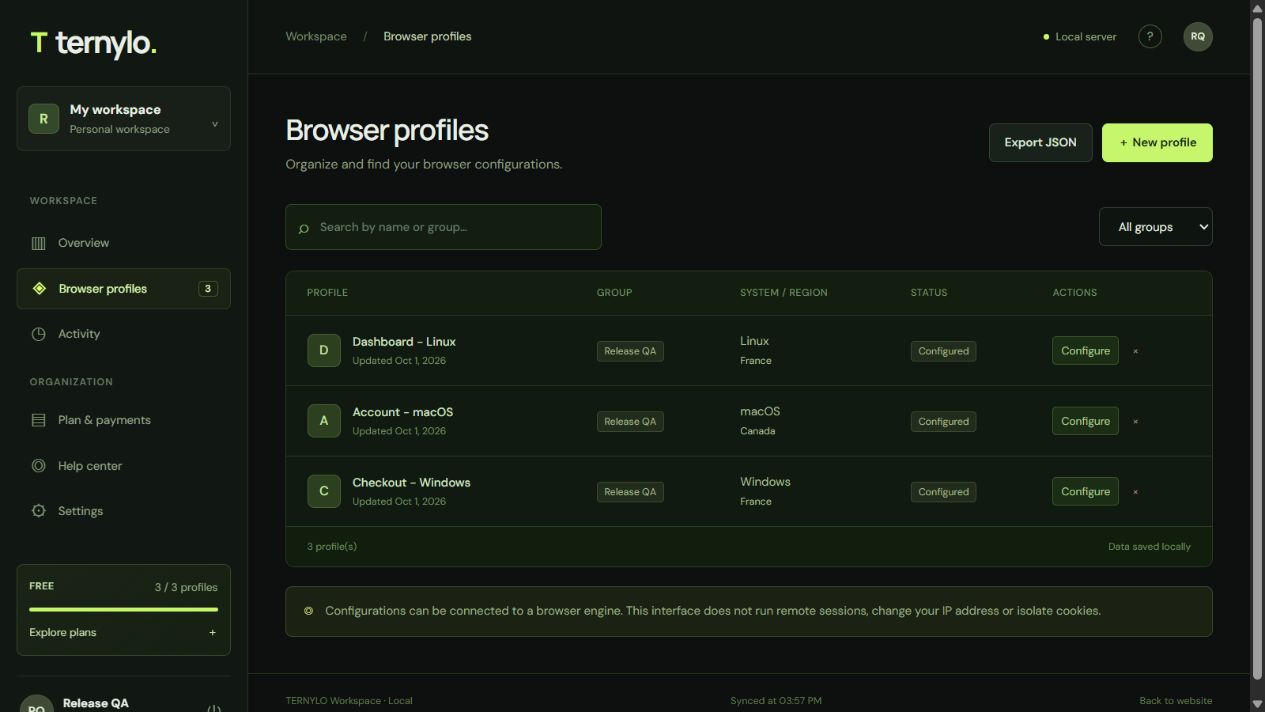
Start with names that tell you what the record is for: Checkout - Windows, Account - macOS or Dashboard - Linux. Starter includes up to 10 configurations after payment confirmation, enough for this three-profile example.
02. Make the project easy to find
Use the same group name for related records. Enter Release QA, for example, in the Group field for each configuration in that project. You can then select it under Filter by group.
Search profiles matches profile names and group names. It does not search the Notes field. Put the terms you want to find quickly in the name or group, and keep detailed instructions in Notes.
- Search “Checkout” to find the matching profile name.
- Select “Release QA” to focus on that group.
- Clear the search and choose “All groups” to return to the full list.
03. Keep the next step in the notes
Select Configure on an existing profile to edit its fields. Write notes that explain the task and expected result. The field supports up to 1,500 characters, so a short checklist usually works well.
Purpose: review the checkout.
Check: currency labels and network instructions.
Expected result: the chosen currency and network stay visible.
Next step: record observations after the manual review.
After you select Save profile, your revised fields remain in the workspace and the update appears in Activity. Keep credentials in your password manager rather than in configuration notes.
04. Describe the setup you intend to use
The operating system and location fields describe a target environment. Choose Windows, macOS or Linux, and select a location label that helps you understand the record.
These are saved settings for organization. Selecting a location does not change your IP address, and selecting a system does not launch a browser on that system. Read browser profiles vs antidetect browsers to understand configuration records, browser engines and proxies.
05. Take a readable copy of your configurations
Select Export JSON from Browser profiles. The download includes every profile in your account, even when a search or group filter is active. Each record includes its name, group, target system, location, notes and creation timestamp.
The export uses the format identifier ternylo-profiles-v1. The JSON field folder contains the group name, and created_at is the creation time in Unix milliseconds. Account passwords, session tokens and payment records are not part of this profile export.
This is a configuration reference, not a full workspace backup. JSON import and restore are not available in this edition. Read the data and backup guidance for the scope of this export.
06. Keep the inventory useful
Return to a configuration to update its name, group or notes as the project changes. Saved records remain available after you sign out and sign in again. The list displays modification dates and Activity records profile creation, updates and deletion.
The Delete action removes a configuration after confirmation; it does not archive it. Export any records you want to retain before removing them.
Build a workflow you can repeat. Use the three-profile QA example for a complete project, or inspect the verified results. When you need more capacity, compare TERNYLO plans.
Put your profiles to work
Build a complete QA project with three profiles on a paid plan: names, groups, target systems, saved instructions and a downloadable example. See the tested workflow and results.
Frequently asked questions.
Can I create profiles before topping up?
No. Creating profiles requires a confirmed crypto payment and an active Starter, Pro or Team plan. Account registration is free; paid plans provide up to 10, 100 or 500 configurations.
Does profile search include notes?
No. The current search matches profile names and group names. Use those fields for terms you want to find quickly.
Does Export JSON respect my current filter?
No. The export contains every configuration record in your account, regardless of the current search or group filter.
Can I import the exported JSON into TERNYLO?
JSON import and restore are not available in this edition. The export is a readable reference containing your configuration fields and notes.
Open your workspace.
Find your configurations and orders in your personal workspace.